Overview
Notification Preferences allow you to control how you receive event-related notifications in Key AI. You can choose which event notifications you want to receive, helping you stay informed about the events that matter most while reducing unnecessary notifications.
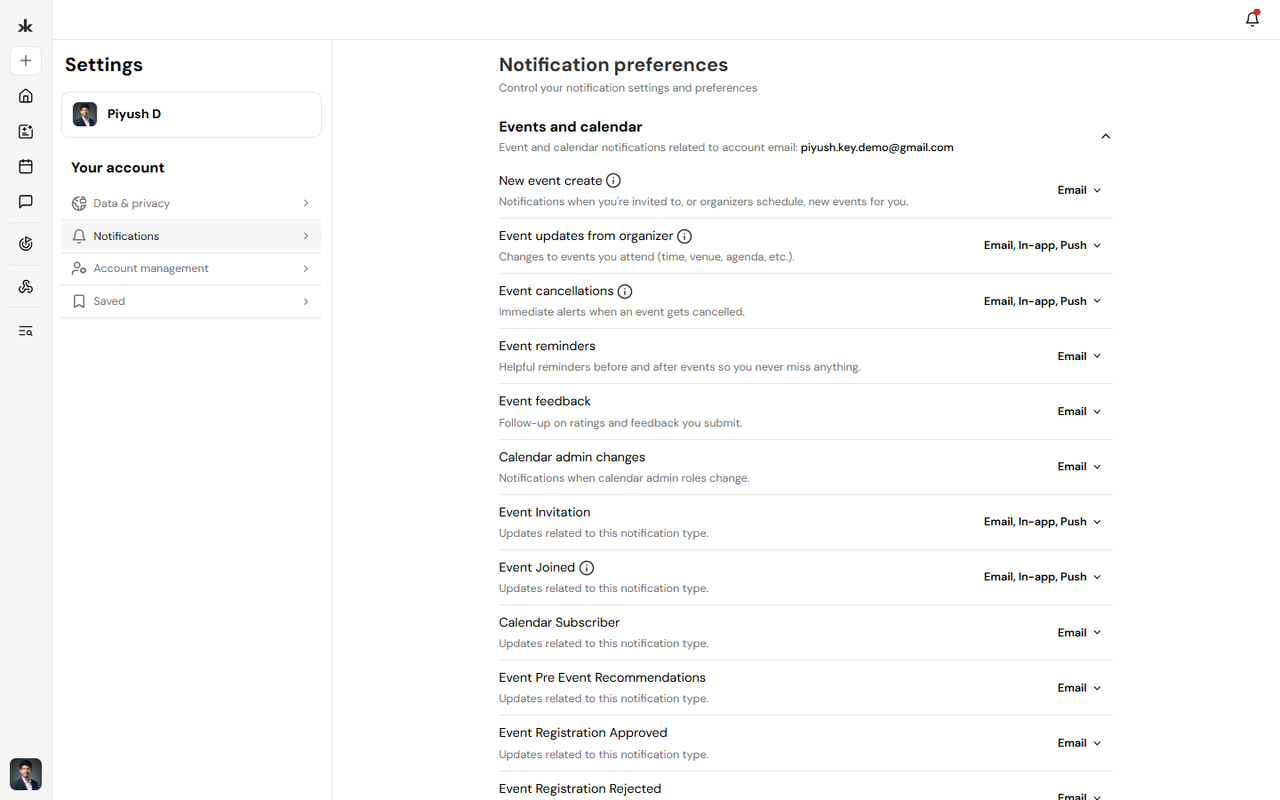
Manage Notification Preferences
To update your notification preferences:
- Sign in to your Key AI account.
- Navigate to Settings.
- Select Notifications.
- Review the available event notification options.
- Enable or disable notifications based on your preferences.
- Your changes are saved automatically or after clicking Save, depending on your settings page.
Event Notifications
You can manage notifications related to your event activity, such as:
- Event invitations.
- Event updates.
- Event reminders.
- Other event-related notifications available in your account.
The available notification options may expand as new features are introduced.
Why Manage Notification Preferences?
Customizing your notifications helps you:
- Stay informed about upcoming events.
- Receive important event updates.
- Reduce unnecessary notifications.
- Personalize your Key AI experience.
Best Practices
- Keep event notifications enabled so you don't miss important updates.
- Review your notification preferences periodically.
- Update your preferences as your participation in communities and events changes.
Frequently Asked Questions
What notifications can I manage?
Currently, Key AI allows you to manage event-related notification preferences.
Will turning off notifications affect my event registrations?
No. Disabling notifications only changes how you receive updates. Your event registrations and participation remain unchanged.
Can I enable notifications again later?
Yes. You can update your notification preferences at any time from Settings → Notifications.